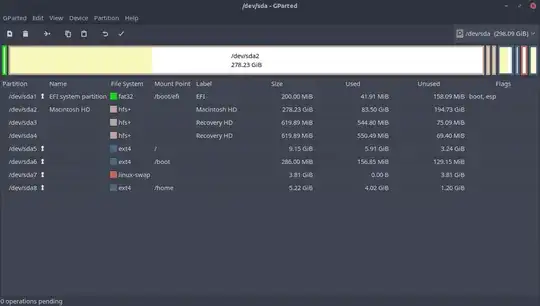
First, a word of warning: the solution to your problem requires something rather risky that may render your Ubuntu installation unbootable. It involves moving your /boot partition. If anything of value is on this installation, back it up before proceeding. Anyways here's the steps:
To disable the swap partition, open /etc/fstab as root and remove the line pertaining to your swap partition. Then, run sudo swapoff /dev/sda1 or whichever sdx# your swap partition is on.
Reclaiming the space from your swap partition would ordinarily be a matter of opening gparted, deleting the old swap partition and resizing the original, but since you want to add it to your home partition you'll need to do it either with your hard drive plugged into another Linux machine or from a live USB with gparted.
Once you are on another machine/live USB, run sudo gparted. The reason you can't resize it immediately, based on your image, is because the swap partition isn't consecutive with your home folder. For partitions to be merged, they need to be 'next' to each other (a partition is a consistent region of data space, and can't be broken up or it'd just be two partitions). It's still possible, but a step needs to be added; move the swap partition next to your home partition.
Doing this is a bit of a process, though. I used a flash drive to show you what needs to be done; here's the starting partitions:
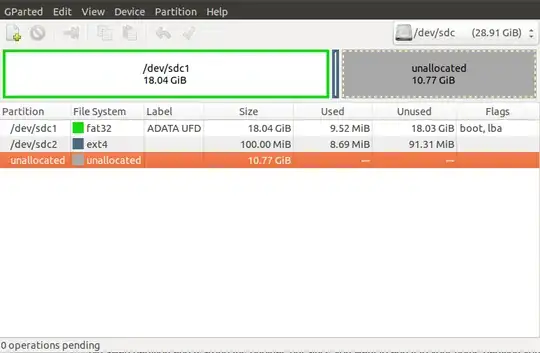
You can see I have 2 partitions and some empty space. To expand partition A into the empty space at the end of the disk, I need to move partition B. Right click partition B and select "resize or move" to get this window:
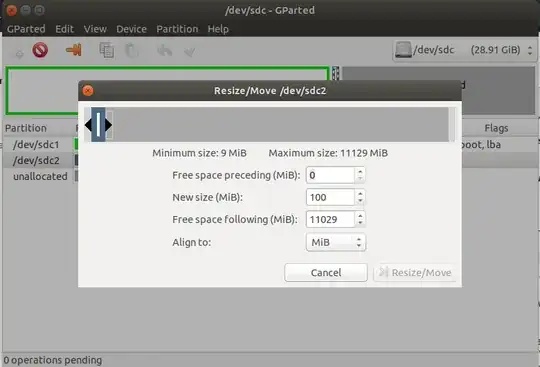
From here, copy the value in "free space following" into "free space preceding". This will move it to the end of the free space, or simply drag the partition to the end with the slider.
Once that's done, apply the operation and your free space will now be next to your home partition. Using the move/resize option should now allow you to adjust the size of your home partition.