Here's a bash script I cooked up (fio-ramp hosted at github):
#!/bin/bash
# Copyright 2019 Mikko Rantalainen
# License: MIT X License
#
# Debian/Ubuntu requirements:
# sudo apt install fio jq
#
# See also: https://fio.readthedocs.io/en/latest/fio_doc.html
#
set -e

if test -z "$1"
then
    echo "usage: $(basename $0) <result.csv> [fio options]" 1>&2
    echo "<result.csv> will contain CSV with µs latency for different IOPS" 1>&2
    echo "  For example, " 1>&2
    echo "  $(basename $0) output.csv --blocksize=8k --rw=randwrite --iodepth=4" 1>&2
    echo "  will compute IOPS latency values for 8K random write QD4." 1>&2
    # Note: if --numjobs=4 then actual IOPS will be 4x the amount targeted because targeted is per job - prefer increasing iodepth instead!
fi

resultfile="$1";
shift; # remove filename from parameters, left rest for fio

log10_series()
{
    count=1
    step=1

    echo 1
    while (( $step < 1000000 ))
    do
        for (( i=1; i < 10; i++ ))
        do
            count=$(( $count + $step ))
            echo $count
        done
        step=$(( 10 * $step ))
    done
}

echo "Writing output to '$resultfile' ..."

# Note: "| while read ..." loop causes shell to create subshell, we have to share data via actual file because variables do not work over subshell boundaries :-/
best_actual_iops_file=$(mktemp --tmpdir fio-ramp-best-actual-iops.XXXXXXXX.tmp)
echo 0 > "$best_actual_iops_file"
trap "rm '$best_actual_iops_file'" EXIT

echo '"Target IO/s", "Actual IO/s", "Min latency (µs)", "Avg latency (µs)", "Max latency (µs)"' | tee "$resultfile"
log10_series | while read iops
do
    LC_ALL=C fio --name TEST --filename=fio-ramp.benchmark.temp --rw=randread \
        --size=500m --io_size=10g --blocksize=4k \
        --ioengine=libaio --direct=1 --numjobs=1 --iodepth=1 \
        --ramp_time=1 --runtime=5 --end_fsync=1 --group_reporting \
        --rate_iops=$iops --rate_iops_min=1 --max_latency=1s \
        --warnings-fatal --output-format=json "$@" \
    | jq '.jobs[] | (.read.iops, .read.lat.min, .read.lat.mean, .read.lat.max)' \
    | xargs -r printf "%s %s %s %s\n" | while read actual_iops min avg max
    do
        printf "% 13s, % 13s, % 18s, % 18s, % 18s\n" "$iops" "$actual_iops" "$min" "$avg" "$max" | tee -a "$resultfile"
        if [ "$(echo "$(cat "$best_actual_iops_file") <= $actual_iops" | bc -l)" == "1" ]; then
            echo "$actual_iops" > "$best_actual_iops_file"
        else
            echo "Actual IOPS dropped when target IOPS was increased, aborting." 1>&2
            exit 1
        fi
    done
done
Example graph (Latency vs IOPS on Intel SSD 910, random 4K read QD32, log-log graph):
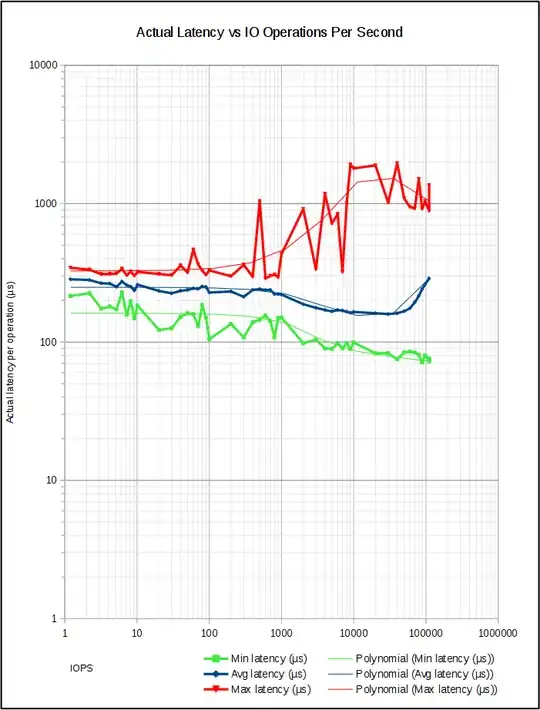
Compared to Diskplorer this runs a new fio process for each IOPS target and collects minimum, average and maximum latency. I know bash better than python so this was easier for me to write. In long run improving Diskplorer could be better in case its license is acceptable (currently no license has been defined for that project).


