1

Recently, I've noticed that my PC is very slow (even youtube videos aren't fluent).

I have acer aspire nitro 5 and my battery is probably dead.

I thought that it's throttling because of high CPU temperatures but it isn't:

sensors

enter image description here

I can see that CPU frequency is about 800.000 MHZ which is the lowest possible.

lscpu

enter image description here

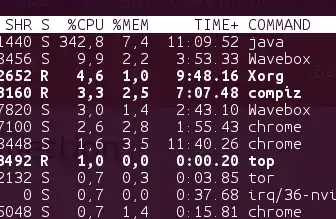
And as you can see the usage is very high (I started Intellij Idea)

[enter image description here
I tried to manually set CPU frequency to max:

sudo cpufreq-set -f `cat /sys/devices/system/cpu/cpu0/cpufreq/scaling_max_freq`

but it returns error:

Error setting new values. Common errors: - Do you have proper administration rights? (super-user?) - Is the governor you requested available and modprobed? - Trying to set an invalid policy? - Trying to set a specific frequency, but userspace governor is not available, for example because of hardware which cannot be set to a specific frequency or because the userspace governor isn't loaded?

Do you know what should I do?

Milano
  • 643
  • 3
  • 12
  • 24

1 Answers1

1

Dead battery

A battery below 5% charge is a critical issue and all sorts of exceptions will be implemented by the software. This might include limiting speed until battery goes above 10-30% charge. Which in your case would never happen. You could probably pick up a used / refurbished battery fairly cheaply on eBay or Amazon.


Set to Performance governor in cpufrequtils

From this Ask Ubuntu answer, follow these steps:

Edit the following file (if it doesn't exist, create it):

sudo nano /etc/default/cpufrequtils

And add the following line to it:

GOVERNOR="performance"

Save and exit.

For changes to immediately take effect without rebooting, run:

sudo /etc/init.d/cpufrequtils restart

Then you can run cpufreq-info to see informations about your cpu frequency, governor and more:

$ cpufreq-info
current policy: frequency should be within 800 MHz and 3.90 GHz.
          The governor "performance" may decide which speed to use
          within this range.

From another answer Setting to High Performance: you can see CPU frequency differences between Powersave and Performance governors:

Performance Mode

In performance mode you will then notice CPU% utilization drops by about 5% but also notice speed will increase from about 1000 MHz to 3000 MHz and temperatures will spike by ~10 degree, depending on your processor:

CPU Performance mode.gif


Powersave mode

CPU powersave.gif

Switching back to powersave mode CPU% utilization has spiked by 5%, but CPU frequency has dropped by 1500 MHz and temperature has decreased by about 10 degrees. Overall powersave mode is the best for most configurations.