Whenever I open a .mp4 file using the default videos application on Ubuntu 18.04, this obnoxious 'Unknown' icon in the taskbar pops up that I can't get rid of. The description of the window when hovered over is simply 'OpenGL Renderer'
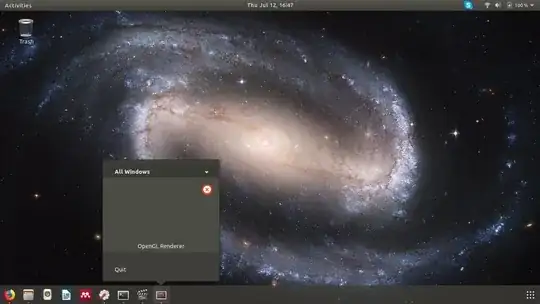
Edit: Output of glxinfo | grep renderer:
GLX_MESA_multithread_makecurrent, GLX_MESA_query_renderer,
GLX_MESA_multithread_makecurrent, GLX_MESA_query_renderer,
Extended renderer info (GLX_MESA_query_renderer):
OpenGL renderer string: Mesa DRI Intel(R) HD Graphics 620 (Kaby Lake GT2)
Edit2: Unfortunately, the suggested duplicates don't really solve my problem. That question seems to deal with having icons that have permanently changed to question marks, even when the icon is dormant in the taskbar. My issue is precisely as follows:
All icons in the taskbar or otherwise are as expected. I open a
.mp4file usingtotem(theVideosapplication)The
.mp4file is opened and plays without issue in theVideosapplication, and theVideosapplication has the correct iconHowever, the error-style second icon appears in the taskbar. When hovered, it is simply labeled
Unknown. When right-clicked, it is labeledOpenGL Renderer. I cannot close the 'window' from this icon (which doesn't seem to actually exist anywhere on my screen), but the icon automatically disappears once I close my.mp4file.

