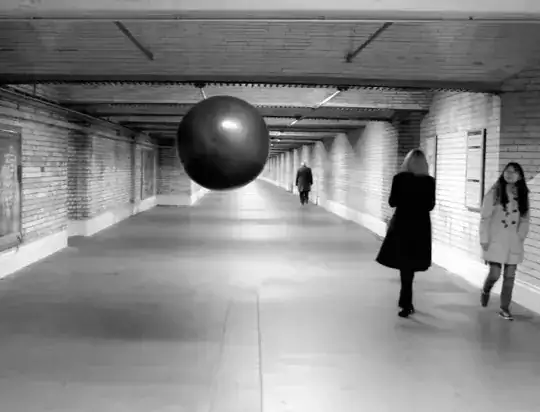
Maybe is kind of late but I found the code for the Space Replay
is in here at the bottom of the last image, specifically in here
/*------------------------------------------------------------------------------

        __-__         Code for Space Replay, a floating black orb that records
      .X+..   ·       and plays back ambient sounds. This sketch was adapted by
    .Xx+-·..    ·     Francesco Tacchini, with the help of Oliver Smith & Brock
    XXx++-...         Craft, from the original WaveRecordPlay example sketch
    XXxx++--.....·    written by Bill Greiman.
    `XXXxxx++---'     This project was created as part of a university project at
      `XXXxxxx'       the Royal College of Art. It's a collaboration with Julinka
         """          Ebhardt and Will Yates-Johnson. See more: vimeo.com/88992597

------------------------------------------------------------------------------*/

#include <SdFat.h>
#include <WaveRP.h>
#include <SdFatUtil.h>
#include <ctype.h>

#define MIC_ANALOG_PIN 0             // Define the analog pin
#define RECORD_RATE 44100            // Define the record rate
#define ADC_REFERENCE ADC_REF_AVCC
#define PRINT_FILE_INFO 0            // Useful for debug: print file info and
#define PRINT_DEBUG_INFO 1           // bad wave file size or SD busy errors
#define MAX_FILE_SIZE 104857600UL    // 100MB or 150 min at 11025 samples/second
#define DISPLAY_RECORD_LEVEL 1

// debugging led
int playLED = 7;
int recLED = 8;
int delStopLED = 9;

// global variables
Sd2Card card;           // SD/SDHC card with support for version 2.00 features
SdVolume vol;           // FAT16 or FAT32 volume
SdFile root;            // volume's root directory
SdFile file;            // current file
WaveRP wave;            // wave file recorder/player
int16_t lastTrack = -1; // Highest track number
uint8_t trackList[32];  // bit list of used tracks

//------------------------------------------------------------------------------
// print error message and halt
void error(char* str) {
  PgmPrint("error: ");
  Serial.println(str);
  if (card.errorCode()) {
    PgmPrint("sdError: ");
    Serial.println(card.errorCode(), HEX);
    PgmPrint("sdData: ");
    Serial.println(card.errorData(), HEX);
  }
  while(1);
}
//------------------------------------------------------------------------------
uint8_t trackName(int16_t number, char* name) {
  if (0 <= number && number <= 255) {
    strcpy_P(name, PSTR("TRACK000.WAV"));
    name[5] = '0' + number/100;
    name[6] = '0' + (number/10)%10;
    name[7] = '0' + number%10;
    return true;
  }
  PgmPrint("Invalid track number: ");
  Serial.println(number);
  return false;
}
//------------------------------------------------------------------------------
// start file playing
uint8_t playBegin(char* name) {
  if (!file.open(&root, name, O_READ)) {
    PgmPrint("Can't open: ");
    Serial.println(name);
    return false;
  }
  if (!wave.play(&file)) {
    PgmPrint("Can't play: ");
    Serial.println(name);
    file.close();
    return false;
  }
#if PRINT_FILE_INFO
  Serial.print(wave.bitsPerSample, DEC);
  PgmPrint("-bit, ");
  Serial.print(wave.sampleRate/1000);
  PgmPrintln(" kps");
#endif // PRINT_FILE_INFO
#if PRINT_DEBUG_INFO
  if (wave.sdEndPosition > file.fileSize()) {
    PgmPrint("play Size mismatch,");
    Serial.print(file.fileSize());
    Serial.print(',');
    Serial.println(wave.sdEndPosition);
  }
#endif // PRINT_DEBUG_INFO
  PgmPrint("Playing: ");
  Serial.print(name);
  return true;
}
//------------------------------------------------------------------------------
// play all files in the root dir
void playTracks(void) {
  dir_t dir;
  char name[13];
  uint8_t np = 0;
  root.rewind();
  while (root.readDir(&dir) == sizeof(dir)) {
    //only play wave files
    if (strncmp_P((char *)&dir.name[8], PSTR("WAV"), 3)) continue;
    // remember current dir position
    uint32_t pos = root.curPosition();
    // format file name
    SdFile::dirName(dir, name);
    if (!playBegin(name)) continue;
    PgmPrintln("");
    while (wave.isPlaying()) {
      uint8_t c = Serial.read();
    }
  }
  file.close();
}
//------------------------------------------------------------------------------
// delete a track
void trackDelete(int16_t track) {
  char name[13];
  if (!trackName(track, name)) return;

  if (SdFile::remove(&root, name)) {
    PgmPrintln("Deleted!");
  }
  else {
    PgmPrintln("Delete failed!");
  }
}
//------------------------------------------------------------------------------
// Finally we have the normal SETUP and LOOP functions -------------------------
//------------------------------------------------------------------------------
void setup(void) {
  Serial.begin(9600);
  if (!card.init()) error("card.init");
  if (!vol.init(&card)) error("vol.init");
  if (!root.openRoot(&vol)) error("openRoot");

  pinMode(playLED, OUTPUT);
  pinMode(recLED, OUTPUT);
  pinMode(delStopLED, OUTPUT);

}
//------------------------------------------------------------------------------
// loop to play and record files.
void loop() {
  digitalWrite(delStopLED, HIGH);
  if (file.isOpen()){
    file.close();      // Make sure file is closed
  }

  int16_t track = -1;
  uint8_t c;
  if (track < 0 ) {
    track = lastTrack;
  }

  char name[13];
  if (track < 0) track = lastTrack + 1;
  if (!trackName(track , name)) return;
  if (file.open(&root, name, O_READ)) {
    file.close();
    trackDelete(track);
    return;
  }
  digitalWrite(delStopLED, LOW);
  digitalWrite(recLED, HIGH);
  Serial.println( "Recording" );    // Record new file...

  if (!file.createContiguous(&root, name, MAX_FILE_SIZE)) {
      PgmPrintln("Create failed");
      return; }
  if(!wave.record(&file, RECORD_RATE, MIC_ANALOG_PIN, ADC_REFERENCE)) {
      PgmPrintln("Record failed");
      file.remove();
      return; }

  delay(5000);     // ...for x milliseconds
  digitalWrite(recLED, LOW);
  wave.stop();
  wave.trim(&file);
  file.close();     // Stop the recording, trim and close the file

  digitalWrite(playLED, HIGH);
  playTracks();     // Play the file
  digitalWrite(playLED, LOW);
}
About your questions,
In the latest WaveRP library there's a folder where it explains how to attach a microphone to the waveshield. And I'm guessing I don't know for sure, but I'd say they're using a contact mic, the contact mics are both, mics and speakers, some cheap walkies also use them. So I'm guessing that they're using only one?
Contact mics pick up vibration so, I think the plastic cone that they're using is for de contact mic to pick up the vibrations of the surroundings sounds.
A better way to design it? I think that it depends. In a way is an art piece. So, a better way to design it... is like to ask VanGogh a better way to paint sunflowers.
But I think always the sound can be better. A way to improve it could be making a better amplifier circuit for reduce the noise or separating the mic and the speakers... But I don't know, I think it depends what you want to make and what you want to achieve. Because if you want it to float is better to have the leastest components. But if the sound is the priority I think it can be much more better using an amplifier, a better mic, etc.
Also, now in the Adafruit Wave Shield's page there is a project of realtime voice changer, that also record and playbacks. More information here