The Arduino Uno board has limited RAM which means it has a limited call stack available. Sometimes, recursion is the only quick option to implement a certain algorithm. So, given that the call stack is severely limited, what would be a way to find out that given a certain program running on the board, exactly how many recursive calls can you afford before there is a stack overflow (and bad things happen)?
Asked
Active
Viewed 7,977 times

5 Answers
15
If you really want to recurse (and as @jippie said it is a bad idea; subliminal message: don't do it) and want to know how much you can recurse, then you will have to perform some calculation and experiments; also you generally will have only an approximation of it as it depends a lot on the memory state at the time your recursive function will be called.
For this, you should first know how SRAM is organized inside AVR-based Arduino (it won't apply to e.g. the Arduino Galileo by Intel). The following diagram from Adafruit shows it clearly:
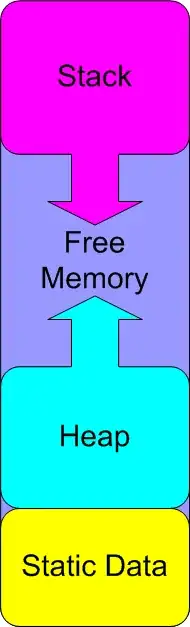
Then you need to know the total size of your SRAM (depends on Atmel MCU, hence what kind of Arduino board you have).
On this diagram, it is easy to find out ths size of Static Data block as it is known at compile-time and won't change later on.
The Heap size can be more difficult to know as it can vary at runtime, depending on dynamic memory allocations (malloc or new) performed by your sketch or the libraries it uses. Using dynamic memory is quite rare on Arduino, but some standard functions do it (type String uses it, I think).
For the Stack size, it will also vary during runtime, based on the current depth of function calls (each function call takes 2 bytes on the Stack to store the address of the caller) and the number and size of local variables including passed arguments (that are also stored on the Stack) for all the functions called until now.
So let's suppose your recurse() function uses 12 bytes for its local variables and arguments, then each call to this function (the first one from an external caller and the recursive ones) will use 12+2 bytes.
If we suppose that:
- you are on Arduino UNO (SRAM = 2K)
- your sketch does not use dynamic memory allocation (no Heap)
- you know the size of your Static Data (let's say 132 bytes)
- when your
recurse()function is called from your sketch, the current Stack is 128 bytes long
Then you are left with 2048 - 132 - 128 = 1788 available bytes on the Stack. The number of recursive calls to your function is thus 1788 / 14 = 127, including the initial call (which is not a recursive one).
As you can see, this is very difficult, but not impossible to find what you want.
A simpler way to get the stack size available before recurse() is called would be to use the following function (found on Adafruit learning center; I have not tested it myself):
int freeRam ()
{
  extern int __heap_start, *__brkval;
  int v;
  return (int) &v - (__brkval == 0 ? (int) &__heap_start : (int) __brkval);
}
I strongly encourage you to read this article at Adafruit learning center.

Gabriel Staples
- 1,375
- 11
- 27

jfpoilpret
- 9,162
- 7
- 38
- 54
9
Recursion is bad practice on a microcontroller as you already stated yourself and you probably want to avoid it whenever possible. On the Arduino site there are some examples and libraries available for checking free RAM size. You can for example use this to figure out when to break recursion or a bit trickier/riskier to profile your sketch and hard code the limit in it. This profile would be required for every change in your program and for every change in Arduino tool chain.

jippie
- 2,911
- 14
- 23
6
It depends on the function.
Every time a function is called, a new frame is pushed onto the stack. It will usually contain various critical items, potentially including:
- Return address (the point in the code from which the function was called).
- The local instance pointer (
this) if calling a member function. - Parameters passed into the function.
- Register values which need to be restored when the function ends.
- Space for local variables inside the called function.
As you can see, the stack space required for a given call depends on the function. For example, if you write a recursive function which only takes an int parameter and uses no local variables, it won't need much more than a few bytes on the stack. That means you can recursively call it far more than a function which takes several parameters and uses a lot of local variables (which will eat up the stack much quicker).
Obviously the state of the stack depends on what else is going on in the code. If you start a recursion directly within the standard loop() function, then there probably won't be a lot on the stack already. However, if you start it nested several levels deep in other functions, then there won't be as much room. That will affect how many times you can recurse without exhausting the stack.
It's worth noting that tail recursion optimisation exists on some compilers (although I'm not sure if avr-gcc supports it). If the recursive call is the very last thing in a function, it means it is sometimes possible to avoid altering the stack frame at all. The compiler can just re-use the existing frame, since the 'parent' call (so to speak) is finished using it. That will mean you can theoretically keep recursing as much as you like, so long as your function doesn't call anything else.

Peter Bloomfield
- 10,972
- 9
- 48
- 87
2
I had this exact same question as I was reading Jumping into C++ by Alex Allain, Ch 16: Recursion, p.230, so I ran some tests.
TLDR;
My Arduino Nano (ATmega328 mcu) can do 211 recursive function calls (for the code given below) before it has a stack overflow and crashes.
First off, let me address this claim:
Sometimes, recursion is the only quick option to implement a certain algorithm.
[Update: ah, I skimmed the word "quick". In that case you have some validity. Nevertheless, I think it's worth saying the following.]
No, I don't think that is a true statement. I'm pretty certain all algorithms have both a recursive and a non-recursive solution, without exception. It's just that sometimes it is significantly easier to use a recursive algorithm. Having said that, recursion is very much frowned upon for use on microcontrollers and would probably never be allowed in safety-critical code. Nevertheless, it is possible of course to do it on microcontrollers. To know how "deep" you can go into any given recursive function, just test it! Run it in your real-life application in a real-life test case, and remove your base condition so that it will infinitely recurse. Print out a counter and see for yourself how "deep" you can go so you know whether or not your recursive algorithm is pushing the limits of your RAM too close to be used practially. Here's an example below to force stack overflow on an Arduino.
Now, a few notes:
How many recursive calls, or "stack frames" you can get is determined by a number of factors, including:
- The size of your RAM
- How much stuff is already on your stack or taken up in your heap (ie: your free RAM matters;
free_RAM = total_RAM - stack_used - heap_used, or you might sayfree_RAM = stack_size_allocated - stack_size_used) - The size of each new "stack frame" which will be placed onto the stack for every new recursive function call. This will depend upon the function being called and its variables and memory requirements, etc.
My results:
- 20171106-2054hrs - Toshiba Satellite w/16 GB RAM; quad-core, Windows 8.1: final value printed before crash: 43166
- took several seconds to crash--maybe 5~10?
- 20180306-1913hrs Dell high-end laptop w/64 GB RAM; 8-core, Linux Ubuntu 14.04 LTS: final value printed before crash: 261752
- followed by the phrase
Segmentation fault (core dumped) - took only ~4~5 sec or so to crash
- followed by the phrase
- 20180306-1930hrs Arduino Nano: TBD---is at ~250000 and still counting---the Arduino optimization settings must have caused it
to optimize out the recursion...??? Yes, that is the case.
- Add
#pragma GCC optimize ("-O0")to the top of the file and redo:
- Add
- 20180307-0910hrs Arduino Nano: 32 kB flash, 2 kB SRAM, 16 MHz processsor: final value printed before crash: 211
Here are the final print results: 209 210 211 ⸮ 9⸮ 3⸮- took only a fraction of a second once it started printing at 115200 serial baud-rate--maybe 1/10 sec
- 2 kiB = 2048 bytes / 211 stack frames = 9.7 bytes/frame (assuming ALL of your RAM is being used by the stack--which actually isn't the case) --but this seems very reasonable nonetheless.
The code:
The PC application:
/*
stack_overflow
 - a quick program to force a stack overflow in order to see how many stack frames in a small function can be loaded onto the stack before the overflow occurs

By Gabriel Staples
www.ElectricRCAircraftGuy.com
Written: 6 Nov 2017
Updated: 6 Nov 2017

References:
 - Jumping into C++, by Alex Allain, pg. 230 - sample code here in the chapter on recursion

To compile and run:
Compile: g++ -Wall -std=c++11 stack_overflow_1.cpp -o stack_overflow_1
Run in Linux: ./stack_overflow_1
*/

#include <iostream>

void recurse(int count)
{
  std::cout << count << "\n";
  recurse(count + 1);
}

int main()
{
  recurse(1);
}
The Arduino "Sketch" program:
/*
recursion_until_stack_overflow
- do a quick recursion test to see how many times I can make the call before the stack overflows

Gabriel Staples
Written: 6 Mar. 2018
Updated: 7 Mar. 2018

References:
- Jumping Into C++, by Alex Allain, Ch. 16: Recursion, p.230
*/

// Force the compiler to NOT optimize! Otherwise this recursive function below just gets optimized into a count++ type
// incrementer instead of doing actual recursion with new frames on the stack each time. This is required since we are
// trying to force stack overflow.
// - See here for all optimization levels: https://gcc.gnu.org/onlinedocs/gcc/Optimize-Options.html
//   - They include: -O1, -O2, -O3, -O0, -Os (Arduino's default I believe), -Ofast, & -Og.

// I mention `#pragma GCC optimize` in my article here: http://www.electricrcaircraftguy.com/2014/01/the-power-of-arduino.html
#pragma GCC optimize ("-O0")

void recurse(unsigned long count) // each call gets its own "count" variable in a new stack frame
{
  // delay(1000);
  Serial.println(count);

  // It is not necessary to increment count since each function's variables are separate (so the count in each stack
  // frame will be initialized one greater than the last count)
  recurse (count + 1);

  // GS: notice that there is no base condition; ie: this recursive function, once called, will never finish and return!
}

void setup()
{
  Serial.begin(115200);
  Serial.println(F("\nbegin"));
  // First function call, so it starts at 1
  recurse (1);
}

void loop()
{
}
References:
- Jumping into C++ by Alex Allain, Ch 16: Recursion, p.230
- http://www.electricrcaircraftguy.com/2014/01/the-power-of-arduino.html - literally: I referenced my own website during this "project" to remind myself how to change Arduino compiler optimization levels for a given file with the
#pragma GCC optimizecommand since I knew I had it documented there.
Gabriel Staples
- 1,375
- 11
- 27
1
I wrote this simple test program:
void setup() {
  // put your setup code here, to run once:
  Serial.begin(115200);
  recurse(1);
}

void loop() {
  // put your main code here, to run repeatedly:

}

void recurse(long i) {
  Serial.println(i);
  recurse(i+1);
}
I compiled it for the Uno, and as i write it has recursed over 1 million times! I don't know, but the compiler may have optimized this program

TheDoctor
- 3,499
- 1
- 22
- 39