I'm new here. I'm not a native speaker, so pardon my English.
I just received my Arduino Leonardo today. I tried some basic calculations and stuff like blinking and LCD interfacing. Its interesting.
I am now trying to make a tachometer with the Leonardo. I'm following this tutorial.
I guess the board they've used differs from the Arduino Leonardo (ie pin 3 is interrupt0 in the Leonardo but it is pin 2 in the Arduino Uno board used in the tutorial). I tried changing the pins on the program and reconnecting the circuit but it doesn't work.
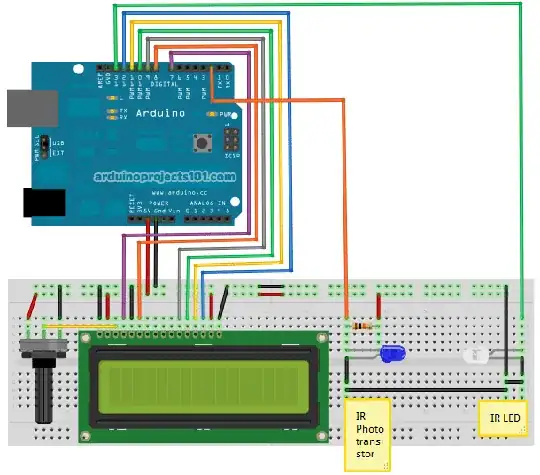
This is the code from the tutorial:
/* Optical Tachometer
 *
 * Uses an IR LED and IR phototransistor to implement an optical tachometer.
 * The IR LED is connected to pin 13 and ran continually.
 * Pin 3 (interrupt 0) is connected across the IR detector.
 *
 * Code based on: www.instructables.com/id/Arduino-Based-Optical-Tachometer/
 * Coded by: arduinoprojects101.com
 */

int ledPin = 13; // IR LED connected to digital pin 13
volatile byte rpmcount;
unsigned int rpm;
unsigned long timeold;
// include the library code:
#include <LiquidCrystal.h>
// initialize the library with the numbers of the interface pins
LiquidCrystal lcd(7, 8, 9, 10, 11, 12);

void rpm_fun() {
  //Each rotation, this interrupt function is run twice,
  //so take that into consideration for calculating RPM
  //Update count
  rpmcount++;
}

void setup() {
  lcd.begin(16, 2); // intialise the LCD
  //Interrupt 0 is digital pin 2, so that is where the IR detector is connected
  //Triggers on FALLING (change from HIGH to LOW)
  attachInterrupt(0, rpm_fun, FALLING);
  //Turn on IR LED
  pinMode(ledPin, OUTPUT);
  digitalWrite(ledPin, HIGH);
  rpmcount = 0;
  rpm = 0;
  timeold = 0;
}

void loop() {
  //Update RPM every second
  delay(1000);
  //Don't process interrupts during calculations
  detachInterrupt(0);
  //Note that this would be 60*1000/(millis() - timeold)*rpmcount if the interrupt
  //happened once per revolution instead of twice. Other multiples could be used
  //for multi-bladed propellers or fans
  rpm = 30*1000/(millis() - timeold)*rpmcount;
  timeold = millis();
  rpmcount = 0;
  //Print out result to LCD
  lcd.clear();
  lcd.print("RPM=");
  lcd.print(rpm);
  //Restart the interrupt processing
  attachInterrupt(0, rpm_fun, FALLING);
}
Can anyone help me to fix the project? Has anyone here tried this project before?
Thank you!


