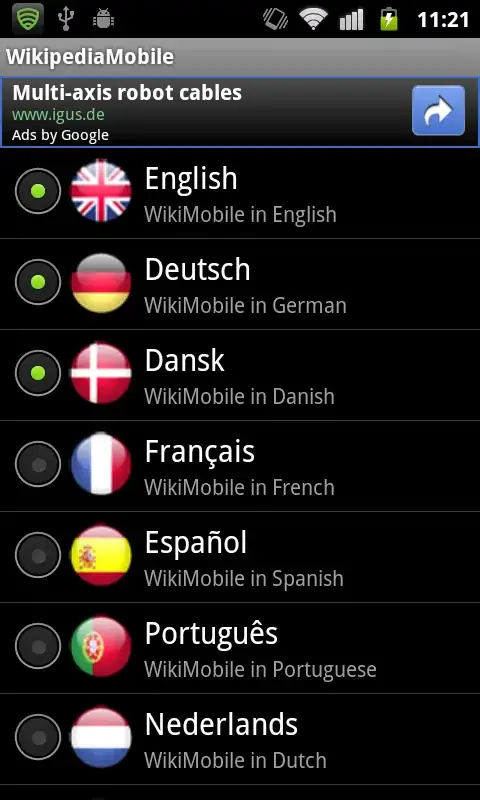
I want to show a single select option in my list. I am using RadioButton in my listView row. I know that RadioGroup is used for single selection.
But problem is that I have added the RadioButton in my ListRowView. Now I want to add all my list items in one RadioButton. I am using Custom Adapter and in getView(). I get the RadioButton in getView(), but when want to add it in RadioGroup it say
"view already have parent , call removeView() in parent before"
And I know its true, but if I remove it from the view. Then it is not visible.
I also try to create and add RadioButton programmatically. And then add it in RadioGrop. And then to view of list row. But this time as the parent is RadioGroup, so again it say
"view already have parent , call removeView() in parent before"
What I want to do is to select only one item in list at a time. My code is as follows.
getView
 public class MyAdapter extends ArrayAdapter < MyMenuItem > {

    private LayoutInflater mInflater ;

    int                    mResource ;
    List < MyMenuItem >    mData ;
    Context context;

    public MyAdapter ( Context context , int resource , int textViewResourceId , List < MyMenuItem > data ) {
        super ( context , resource , textViewResourceId , data ) ;
        this.context = context;
        mData = data ;
        mResource = resource ;
        mInflater = ( LayoutInflater ) getSystemService ( Context.LAYOUT_INFLATER_SERVICE ) ;
    }

    @ Override
    public View getView ( int position , View convertView , ViewGroup parent ) {
        ViewHolder holder = null ;
        if ( convertView == null ) {
            convertView = mInflater.inflate ( mResource , null ) ;
            holder = new ViewHolder ( ) ;
            holder.icon = ( ImageView ) convertView.findViewById ( R.id.icon ) ;
            holder.text = ( TextView ) convertView.findViewById ( R.id.text ) ;
            holder.comment = ( TextView ) convertView.findViewById ( R.id.comment ) ;
            LinearLayout lin = ( LinearLayout ) convertView.findViewById ( R.id.linerList ) ;
            RadioButton rbtn = new RadioButton ( context );
            LayoutParams lparam = new LayoutParams ( LayoutParams.WRAP_CONTENT , LayoutParams.WRAP_CONTENT );
            rbtn.setSelected ( false );
            holder.check = rbtn;
            //radioGroup.addView ( rbtn );
            lin.addView ( rbtn , 0 );

            convertView.setTag ( holder ) ;
        } else {
            holder = ( ViewHolder ) convertView.getTag ( ) ;
        }

        holder.text.setText ( mData.get ( position ).getText ( ) ) ;
        holder.comment.setText ( mData.get ( position ).getComment ( ) ) ;

        holder.icon.setImageResource ( getApplicationContext ( ).getResources ( ).getIdentifier ( mData.get ( position ).getIcon ( ) ,
                "drawable" , getPackageName ( ) )

        ) ;

        return convertView ;
    }

}
My XML for the row
<?xml version="1.0" encoding="utf-8"?>
<LinearLayout
xmlns:android="http://schemas.android.com/apk/res/android"
android:layout_width="fill_parent"
android:layout_height="?android:attr/listPreferredItemHeight"
android:padding="6dip">
<LinearLayout
    android:id = "@+id/linerList"
    android:orientation="horizontal"
    android:layout_width="wrap_content"
    android:layout_height="wrap_content">
    <ImageView
        android:id="@+id/icon"
        android:layout_width="wrap_content"
        android:layout_height="wrap_content"
        android:layout_marginRight="6dip" />
</LinearLayout>
<LinearLayout
    android:orientation="vertical"
    android:layout_width="wrap_content"
    android:layout_weight="1"
    android:layout_height="fill_parent">
    <TextView
        android:id="@+id/text"
        android:layout_width="fill_parent"
        android:layout_height="wrap_content"
        android:layout_weight="1"
        android:gravity="center_vertical"
        android:text="My Application"
        android:textSize="20sp"
        android:singleLine="true"
        android:ellipsize="marquee"
        android:textColor="@color/white" />
    <TextView
        android:id="@+id/comment"
        android:layout_width="fill_parent"
        android:layout_height="wrap_content"
        android:layout_weight="1"
        android:singleLine="true"
        android:ellipsize="marquee"
        android:text="Simple application that shows how to use RelativeLayout"
        android:textSize="14sp"
        android:textColor="@color/light_gray" />
</LinearLayout>