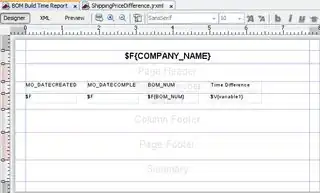
You do not need variables for this, use directly the textFieldExpression
If the fields MO_DATECREATED and MO_DATECOMPLETED are declared:
as java.lang.Date
<field name="MO_DATECREATED" class="java.lang.Date">
    <fieldDescription><![CDATA[]]></fieldDescription>
</field>
The textFieldExpression would be ($F{MO_DATECOMPLETED}.getTime()-$F{MO_DATECREATED}.getTime())/(1000*60*60) + " hours".
Hey thats java exactly so to understand what it does check out this: How to calculate time difference in java?
as java.lang.String
<field name="MO_DATECREATED" class="java.lang.String">
    <fieldDescription><![CDATA[]]></fieldDescription>
</field>
We need to parse them to Date object's first.. your pattern is mm/dd/yy hh:mm a
(new java.text.SimpleDateFormat("mm/dd/yy hh:mm a").parse($F{MO_DATECOMPLETED}).getTime()-new java.text.SimpleDateFormat("mm/dd/yy hh:mm a").parse($F{MO_DATECREATED}).getTime())/(1000*60*60) + " hours"
Considering that they maybe null we better add a printWhenExpression as well
Complete result
<textField>
     <reportElement x="0" y="0" width="100" height="20" uuid="eac93a84-7901-4205-b09c-556d48dc05e1">
        <printWhenExpression><![CDATA[new java.lang.Boolean($F{MO_DATECREATED}!=null && $F{MO_DATECOMPLETED}!=null)]]></printWhenExpression>
    </reportElement>
    <textFieldExpression><![CDATA[(new java.text.SimpleDateFormat("mm/dd/yy hh:mm a").parse($F{MO_DATECOMPLETED}).getTime()-new java.text.SimpleDateFormat("mm/dd/yy hh:mm a").parse($F{MO_DATECREATED}).getTime())/(1000*60*60) + " hours"]]></textFieldExpression>
</textField>
No doubt that it is better that they are java.lang.Date object, both the report will fill faster, no risk for parsing error and you can export correctly to excel ecc. To format a java.lang.Date object as you wish just use the pattern property.
EDIT: Users has opted for the java.util.Date and asked how he can display also minutes, for this I have created a general question on How to create a single expression displaying time difference between two Date's as years, months, days, hours, minutes, seconds and it is now answered
This was the temporary solution
<textField>
     <reportElement x="0" y="0" width="100" height="20" uuid="eac93a84-7901-4205-b09c-556d48dc05e1">
        <printWhenExpression><![CDATA[new java.lang.Boolean($F{MO_DATECREATED}!=null && $F{MO_DATECOMPLETED}!=null)]]></printWhenExpression>
    </reportElement>
    <textFieldExpression><![CDATA[($F{MO_DATECOMPLETED}.getTime()-$F{MO_DATECREATED}.getTime()) / (24* 60 * 60 * 1000)  + " days " +($F{MO_DATECOMPLETED}.getTime()-$F{MO_DATECREATED}.getTime()) / (60 * 60 * 1000) % 24 + " hours " +  ($F{MO_DATECOMPLETED}.getTime()-$F{MO_DATECREATED}.getTime()) / (60 * 1000) % 60 + " minutes"]]></textFieldExpression>
</textField>