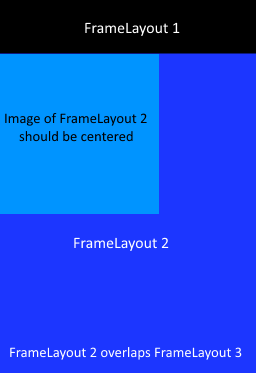
I've a problem with my layout and it would be great, if some Android experts could check it and help me :)
I have a FragmentA which contains another FragmentB.
FragmentA contains 3 FrameLayouts:
- FrameLayout: Should be at the top
- FrameLayout: Should be below the first an contains FragmentB (id= frame2)
- FrameLayout: Should be at the bottom
FragmentB contains also 1 FrameLayout:
- I'm adding programmatically a view (e.g. an image) to this FrameLayout in this way:
frameLayout.addView(new ImageClass(id);
The problem is, that the image is not centered horizontally in the middle.
This is the layout file of the first fragmentA:
<RelativeLayout xmlns:android="http://schemas.android.com/apk/res/android"
    android:gravity="center_horizontal"
    android:layout_width="match_parent"
    android:layout_height="match_parent">

    <FrameLayout
        android:id="@+id/frame1"
        android:layout_width="match_parent"
        android:layout_height="wrap_content" />

    <FrameLayout
        android:id="@+id/frame2"
        android:layout_width="wrap_content"
        android:layout_height="wrap_content"
        android:layout_below="@+id/frame1" />

    <FrameLayout
        android:id="@+id/frame3"
        android:layout_width="match_parent"
        android:layout_height="wrap_content"
        android:layout_alignParentBottom="true" />

</RelativeLayout>
And this is the layout file of the fragmentB (included in FragmentA -> FrameLayout 2 with the ID frame2)
<FrameLayout xmlns:android="http://schemas.android.com/apk/res/android"
    android:id="@+id/imageClass"
    android:background="#0000FF"
    android:layout_width="wrap_content"
    android:layout_height="wrap_content">
</FrameLayout>
And the image will be insert in the view by canvas with this code:
Bitmap image= BitmapFactory.decodeResource(getResources(), id);
canvas.drawBitmap(image, 0, 0, null);
I thought that with android:gravity="center_horizontal" in the RelativeLayout and with android:layout_width="wrap_content" in both FrameLayouts of the FragmentA und FragmentB, the image should be centered. But it is on the left side.
There are two screenshots how it looks (first) and how it should look (second):
Sorry for the links, but I cannot post pictures (not enought reputation)