I want to customize an EditText which should have "constants" like in the picture below, so that I get the minutes and the seconds. (the number interface is irrelevant).
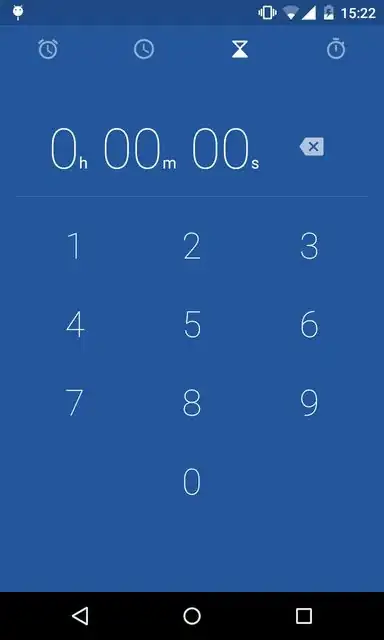
I want to customize an EditText which should have "constants" like in the picture below, so that I get the minutes and the seconds. (the number interface is irrelevant).


Try by this code this code are here i have try by this code .This code is working .
<LinearLayout xmlns:android="http://schemas.android.com/apk/res/android"
xmlns:tools="http://schemas.android.com/tools"
android:layout_width="match_parent"
android:layout_height="match_parent"
android:orientation="vertical">
<EditText
    android:layout_width="fill_parent"
    android:layout_height="50dp"
    android:layout_marginTop="50dp"
    android:textColor="#000000"
    android:background="#CCCCCC"
    />
<LinearLayout
    android:layout_width="fill_parent"
    android:layout_height="wrap_content"
    android:layout_gravity="center"
    android:gravity="center"
    android:orientation="horizontal"
    >
<Button
    android:id="@+id/btn0"
    android:layout_width="wrap_content"
    android:layout_height="wrap_content"
    android:text="0" />

<Button
    android:id="@+id/btn1"
    android:layout_width="wrap_content"
    android:layout_height="wrap_content"
    android:text="1" />

<Button
    android:id="@+id/btn2"
    android:layout_width="wrap_content"
    android:layout_height="wrap_content"
    android:text="2" />
</LinearLayout>
 <LinearLayout
    android:layout_width="fill_parent"
    android:layout_height="wrap_content"
    android:gravity="center"
    android:orientation="horizontal"
    >
<Button
    android:id="@+id/btn3"
    android:layout_width="wrap_content"
    android:layout_height="wrap_content"
    android:text="3" />

<Button
    android:id="@+id/btn4"
    android:layout_width="wrap_content"
    android:layout_height="wrap_content"
    android:text="4" />

<Button
    android:id="@+id/btn5"
    android:layout_width="wrap_content"
    android:layout_height="wrap_content"
    android:text="5" />
</LinearLayout>
 <LinearLayout
    android:layout_width="fill_parent"
    android:layout_height="wrap_content"
    android:gravity="center"
    android:orientation="horizontal"
    >
<Button
    android:id="@+id/btn6"
    android:layout_width="wrap_content"
    android:layout_height="wrap_content"
    android:text="6" />

<Button
    android:id="@+id/btn7"
    android:layout_width="wrap_content"
    android:layout_height="wrap_content"
    android:text="7" />

<Button
    android:id="@+id/btn8"
    android:layout_width="wrap_content"
    android:layout_height="wrap_content"
    android:text="8" />
</LinearLayout>
show here is image below 

First of all, I see no EditText on the screen you posted, that's plain TextViews that are updating on clicking the numbers.
Anyway, you could use multiple TextViews/EditTexts, which would allow you to easily change their formatting as well, or you could programatically change the formatting yourself. If you want to have a string resource that accepts parameters see here on how to do that.

