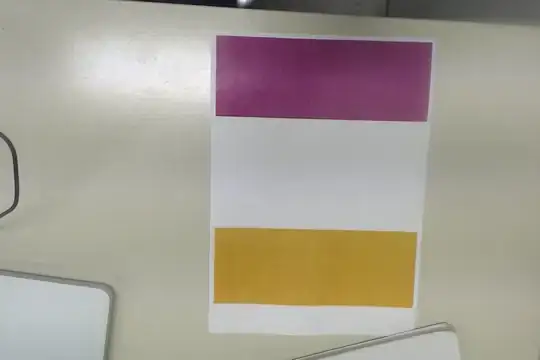
Using cvInRangeS(hsvframe,cvScalar(90, 40, 50) and cvScalar(255, 90, 255),threshy),
how can I get the exact range of values for each color (purple and yellow)?
Using cvInRangeS(hsvframe,cvScalar(90, 40, 50) and cvScalar(255, 90, 255),threshy),
how can I get the exact range of values for each color (purple and yellow)?
Use a color picker web-site to check out the hue values of them.
http://www.color-hex.com/color/eca314
http://www.color-hex.com/color/923ca7
Note that you need to transform the hue angle (0-360) between (0-255) range. Use inranges function for both colors and add the images:
cvInRangeS(hsvframe,cvScalar(20, 0, 0), cvScalar(30, 255, 255),threshorange);
cvInRangeS(hsvframe,cvScalar(200, 0, 0), cvScalar(210, 255, 255),threshpurple);
cvOr(threshorange, threshpurple, threshy);

You might want to try this one:
Mat matSrcCopyForHSVColorDisplay, HSV_image_display;

//Make a copy of the original image
matSrcCopyForHSVColorDisplay = matSrc.clone();

//Convert RGB to HSV
cvtColor(matSrc, HSV_image_display, CV_BGR2HSV);

//To access each pixel in the images we are using this syntax:
//image.at(y,x)[c] where y is the row, x is the column
//and c is H, S or V (0, 1 or 2)
Vec3b p = HSV_image_display.at<Vec3b>(50, 10); //Vec3b - Array of 3 uchar numbers

//p[0] - H, p[1] - S, p[2] - V
printf(text, "H=%d, S=%d, V=%d", p[0], p[1], p[2]);

//putText(matSrcCopyForHSVColorDisplay, text, Font_Position,
//Font_Type, Font_Scale, Font_Colour, Font_Thickness);
//Display the text
putText(matSrcCopyForHSVColorDisplay, text, center,
        FONT_HERSHEY_COMPLEX_SMALL, 2, cvScalar(255, 0, 0), 1, CV_AA);

//Refresh the image
imshow("HSV Value", matSrcCopyForHSVColorDisplay);
printf("H=%d, S=%d, V=%d\n", p[0], p[1], p[2]);


