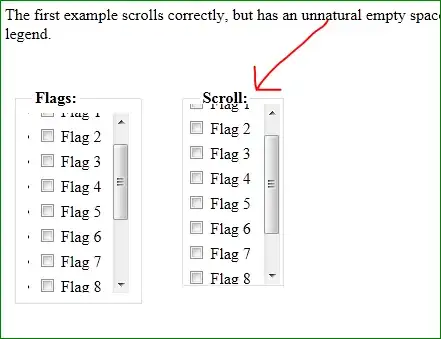
I have this control on my page which is a <div style="max-height: X"> inside a <fieldset> (I uploaded on jsfiddle.net the relevant HTML and CSS code).

As you can see there is a small problem: the area pointed to by the red arrow looks unnaturally empty. The scroll bar should start 9px more above than where it starts now!
Adding position: relative; top: -9px; to the div and padding-top: 9px to the ul fixes it when you are not scrolled, but once you start scrolling things start to look strange:

I need both of these:
- There should not be the gap you see in the first image (pointed by the red arrow)
- There should not be the overlapping issue seen in the 3rd image when scrolled down