I use Bluetooth for my headphones and it used to work more or less in Ubuntu 17.10 (had to redo the pairing process sometimes but then it worked out). After I installed Dash-to-Panel-Extension for GNOME for whatever reason the Bluetooth adapter turned off and won't turn on again.
In my Bluetooth settings it says 'Bluetooth Turned Off'. I can push the button to turn it on, but nothing happens.
Also I can press the "turn on" button in the Panel, but nothing happens.

Things I've tried:
- Deactivating Dash-to-Panel Extension (and restart computer)
sudo service bluetooth startsudo apt-get install --reinstall bluezreinstalled all Bluetooth components with
sudo apt install bluez bluez-cups bluez-obexd gnome-bluetooth indicator-bluetooth libbluetooth3:amd64 libgnome-bluetooth13:amd64 pulseaudio-module-bluetoothDifferent variations of turning the bluetooth switch of my laptop off and on and restarting
rfkill list allOutput:
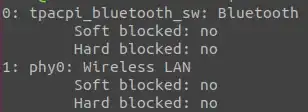
(so it seems not to be blocked)lspci -knn | grep Net -A3; lsusb; dmesg | grep -i blueOutput:
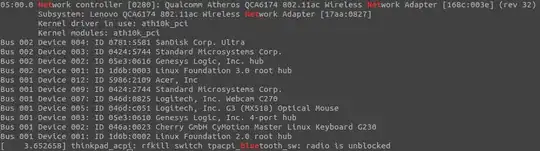
(again seems not to be blocked)bluetoothctl listOutput:



Now I'm running out of ideas. Are there any other approaches?


