3

I could not find this specific issue on Google. After I updated from Ubuntu 15.04 to 16.04 LTS, next to xfce4 and unity not working correctly, also the icons from the Breeze icon theme are behaving in an unexpected manner. I have tried to reconfigure and reinstall these packages, however the problem remains.

  • Icons such as the Firefox icon are missing
  • Instead of the blue folder icon I am seeing a simple flat white icon, this happens as well for icons of files with extensions of images, text, jars, etc.
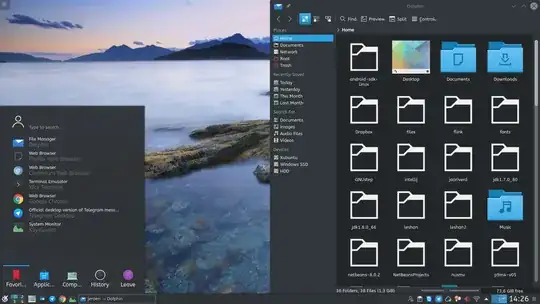
Here is a screenshot.

Thanks for your help.

Yatoom
  • 461

3 Answers3

2

This problem was caused by some application from Ubuntu/Unity. In my inspection, it was appmenu-qt5 which was setting an environment variable QT_QPA_PLATFORMTHEME incorrectly, trying to unify look and feel in GTK and QT. To solve this, we have two options

Option 1: Remove package appmenu-qt5

Just remove the offending package appmenu-qt5

sudo apt remove appmenu-qt5

But, I don't recommend it, if important packages for Unity tries to go away with it. Though, In my case, no other packages was depending on it and simply went away.

Option 2: Unset the environment variable

You can also unset the environment variable QT_QPA_PLATFORMTHEME to solve this. I recommend this solution.

Put these lines at the end of your ~/.profile file.

## Fixing QT problems caused by `appmenu-qt5` in KDE environement
if [ "x$XDG_SESSION_DESKTOP" == "xplasma" ] || [ "x$XDG_SESSION_DESKTOP" == "xKDE" ]; then
    unset QT_STYLE_OVERRIDE
    unset QT_QPA_PLATFORMTHEME
fi
Anwar
  • 77,855
0

I recently encountered the same issue. I get over with it using "QT5 settings" program (just search for it, it is already available), changing icon set through its "Icon Theme" settings. It is just easier than changing configuration files. It just works.

Ömer Şayli
  • 106
  • 1
  • 6
0

Solution for the folder icons: In System Settings -> Applications -> File Associations -> innode -> directory click on the icon. Under System icons choose places and then choose the folder icon from the icons below.

However, that obviously did not change the Firefox icon.

What finally solved all icon problems was to restore my KDE desktop to default via executing

mv ~/.kde4 ~/.kde4.old