If what you want is to make a bootable Windows USB (for installation purposes) from the Windows OS ISO file, then that could be easier than you think.
You will need first to prepare the USB disk by formatting it into MBR/DOS disk format first which can be done with e.g. gnome-disks by selecting the USB disk then choosing Format Disk ... from the main menu like so:
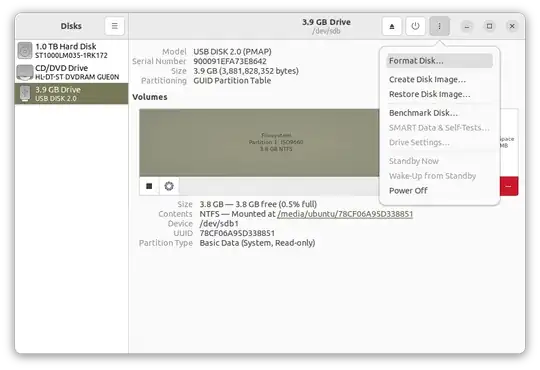
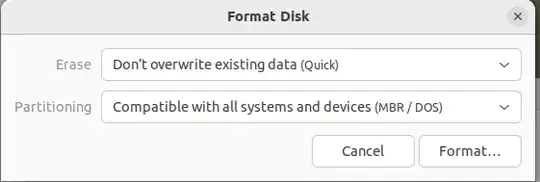
... Then choosing the right format and formatting the disk:
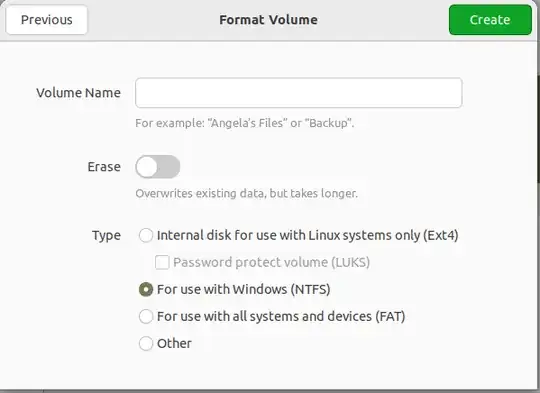
... then creating an NTFS partition on the disk by clicking the + sign and then clicking Next in the top of the dialog box and then choosing NTFS and formatting by clicking Create like so:
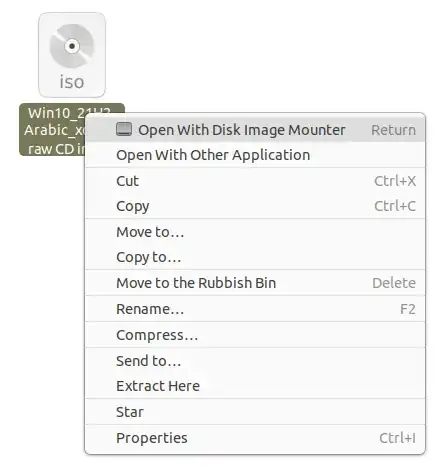
Now, your USB is ready ... next mount the Windows ISO by right clicking on it and choosing Open with disk image mounter like so:
... then select the newly created mount point from the left side of the file manager like so:

... finally copy all those Windows files to the NTFS partition you previously created on the USB disk ... Wait for the copying process to finish and make sure you gracefully eject the USB disk afterwords to avoid any copy/filesystem errors ... Enjoy, computer life can be that easy sometimes :-)


